
Moodle Load Balancing and High Availability

Support a More Reliable Moodle Experience
Whether students submit assignments, take online exams, or access course materials, Moodle must perform reliably as demand shifts. Progress® Kemp® LoadMaster® helps educational institutions deliver consistent access to Moodle while simplifying scalability, availability and traffic management.
Moodle is designed to scale and can accommodate extremely large user communities. The LoadMaster solution simplifies Moodle scaling by load-balancing user traffic across cluster nodes and offloading security overhead.
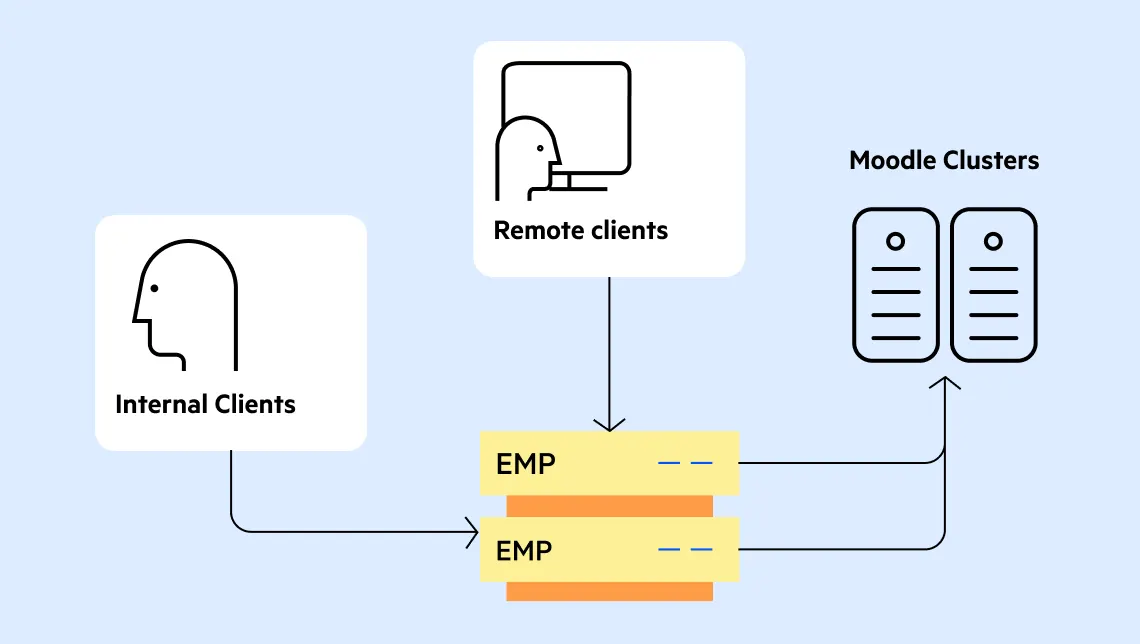
The LoadMaster solution can monitor each Moodle server individually to assess capacity and health and in the event of a server being unavailable, the LoadMaster load balancer will redirect sessions to the remaining cluster members. Client traffic can be balanced using methods such as round robin or least connections to ensure traffic is appropriately distributed between the nodes in the Moodle Cluster.
The LoadMaster solution provides a much more advanced, resilient and easier-to-manage environment than HAProxy for Moodle, with features such as SSL offload and content caching. LoadMaster is a proven solution for Moodle load balancing with predefined templates and optional professional services to simplify deployment and operation.
Maintain Learning Continuity as Demand Changes
Moodle environments can experience changing levels of activity as students and educators access courses, assessments, assignments and other online resources. The LoadMaster ADC helps institutions build a more resilient and scalable Moodle environment by distributing application traffic and adapting when individual servers become unavailable.

Maintain Access to Moodle
Continuously monitor the health of individual Moodle servers and direct traffic away from unavailable nodes. This helps reduce the effect of server outages on access to digital learning resources.

Balance Changing User Demand

Reduce SSL Processing Overhead
Adapt Deployment to Your Environment

Add Redundancy to the Delivery Layer
Simplify Moodle Deployment
How LoadMaster Supports Moodle
The LoadMaster solution sits between Moodle users and the Moodle server cluster, presenting a virtual service that manages application traffic.
When a user connects to Moodle, LoadMaster directs the request to an appropriate server based on the configured load-balancing method. Each server is monitored individually. When a server becomes unavailable, it redirects traffic to the remaining available cluster members.
This approach helps institutions scale their Moodle environments across multiple servers while maintaining a consistent point of access for users.

Designed for Critical Moodle Workloads
The LoadMaster load balancer can support Moodle environments used to deliver:
- Course content and learning resources
- Assignments and submissions
- Online assessments
- Learner and educator collaboration
- Administrative learning services
- Remote and blended learning
Why Progress Kemp LoadMaster for Moodle?
Moodle plays a critical role in delivering digital learning experiences, from course delivery and collaboration to online assessments and remote education. The Progress Kemp LoadMaster load balancer helps educational institutions build a more resilient Moodle environment by distributing traffic across multiple servers, monitoring application health and supporting flexible deployment models that align with security and infrastructure requirements. With support for high availability, SSL offload and scalable traffic management, the LoadMaster solution helps institutions maintain reliable access to learning resources while simplifying the operation and growth of Moodle deployments.
Help enable students and educators to access the Moodle resources they depend on, whenever learning happens.Resources

Deploy Loadmaster for Moodle with the help of this Guide
Read Deployment Guide
Use the ready-made Loadmaster template for Moodle
Download Template
How to Load Balance a Moodle Cluster: Enable high availability and app security
Learn moreFrequently Asked Questions
Why does Moodle need a load balancer?
As a Moodle environment grows across multiple servers, a load balancer provides a consistent entry point and distributes user traffic across the Moodle cluster. LoadMaster can also monitor each Moodle server and redirect traffic when a node becomes unavailable.
Can LoadMaster improve Moodle availability?
Yes. LoadMaster monitors individual Moodle servers and redirects sessions to the remaining cluster members if a server becomes unavailable.
Which load-balancing methods are available for Moodle?
Round Robin and Least Connections are examples of methods that can be used to distribute traffic between Moodle cluster nodes.
Does LoadMaster support SSL offload for Moodle?
Yes. With SSL offload, LoadMaster terminates the SSL session and communicates with the selected Moodle server over HTTP.
Does LoadMaster support different network topologies?
Yes. The recommended configuration documentation states that either a one-arm or two-arm topology can be used.
Are there prerequisites for deploying LoadMaster with Moodle?
The Moodle servers must already be configured correctly. If Active Directory is part of the environment described by the deployment guide, it must also be set up and configured correctly. The guide assumes working knowledge of Moodle configuration editing and basic LoadMaster skills.

