Virtual Patching with LoadMaster WAF: A Case Study on WordPress CVE-2026-63030

Application security is a cornerstone of the Progress® Kemp® LoadMaster® solution. In the era of Application Delivery Controllers (ADCs), it's expected that a load balancer should go above and beyond the role of being a ‘simple reverse proxy’: it should also bolster the security of the applications it sits in front of.
The Progress® Kemp® LoadMaster® load balancer ships with an integrated, fully featured, industry-standard Web Application Firewall (WAF) from OWASP. (Check out our new bite-sized WAF video series for a primer.)
The LoadMaster WAF offers superior flexibility. This stands in stark contrast to most cloud WAF platforms and “WAF as a service” solutions. These solutions typically offer stripped-down WAF functionality and remove most configuration options in the interests of being ‘simple’ and ‘easy’.
This is a flawed approach.
Making security basic is the wrong approach to making security accessible. When a WAF is reduced to a single slider or two, then its substance is gone. The WAF is less useful, its protection is less meaningful and its flexibility is gone.
Some vendors do have ‘premium’ WAF tiers, which charge more to expose useful WAF options and allow some custom WAF rule processing. The LoadMaster solution supports fully customizable WAF logic, with no limits on the number of rules or the level of complexity. This makes it possible to apply virtual patching using the LoadMaster WAF and allows for defending known vulnerable applications, including legacy applications. This level of flexibility isn’t possible with most cloud platform WAFs.
What Is a Virtual Patch?
A virtual patch is a method of mitigating a known vulnerability in a web application without patching the vulnerable application itself. It is almost always the best and the correct course of action to patch the actual vulnerability; however, this is not always possible (as described in a later section).
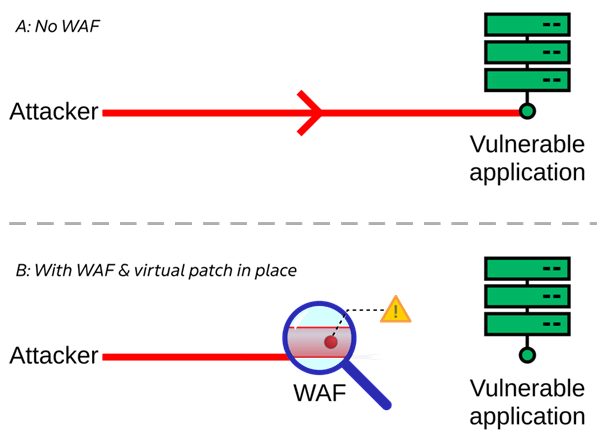
It’s reckless to leave a known vulnerable application open to attackers. Rather than waiting to apply a fix patch (which, in some cases, may never materialize), a WAF, such as the LoadMaster WAF, can be placed in front of the vulnerable application and armed with a virtual patch.
The virtual patch takes the form of WAF security rules designed to help block known patterns. For example, if the application can be exploited by sending a PUT request to /foo/bar, then a WAF security rule can be enforced to specifically block all PUT requests to /foo/bar (or block all PUT requests or block all requests to /foo/bar: there is flexibility based on what is actually required)
This ‘virtually patches’ the vulnerability without having to modify the application itself in any way.
When (and Why) to Use Virtual Patching?
To reiterate, the best solution is almost always to fully and properly patch the offending application to completely fix a vulnerability. There are, however, many situations in which this is not possible, either temporarily or permanently. These scenarios require another solution (such as virtual patching) to be implemented.
- Vulnerable application is proprietary software
Without access to the source code to enact a fix, timelines are completely in the hands of the software vendor, whose sense of urgency may be very different from that of their customers. If a fix is needed immediately, then a virtual patch may be the only viable (stopgap) solution. - Application is legacy / End of Life software
Software that’s gone End of Life (EoL) will likely never receive a fix. This is doubly true for proprietary EoL applications. - Don’t have the skill set to fix the application
Software is complicated. Even if writing and applying a fix is technically possible, it may well be that the skill set required to fix the problem (and to do so securely, without leaving any holes open or breaking things) is not forthcoming or not financially viable to source. - Applying a fix patch is not possible (at least not immediately)
Even if an official, verified patch is available, it may be impossible to apply it. Modifying production servers may be completely forbidden or just plain impractical due to corporate policies, maintenance window requirements or the need to drive/fly/ship someone out to the servers and the time that takes.
For these reasons, and many others, applying a virtual patch is often the best (or only) way to address a security vulnerability.
WordPress CVE-2026-63030
Researchers published a pair of related WordPress vulnerabilities in July 2026, namely CVE-2026-63030 and CVE-2026-60137, with one rated critical. This pair of vulnerabilities, when used together, allowed attackers to exploit flaws in WordPress REST API batch processing, potentially leading to remote code execution (RCE).
WordPress administrators should have already updated to patch these issues; performing a full and proper update is the correct course of action. However, this situation is a good example of how virtual patching can help defend against attacks between the time an issue becomes public knowledge and the time that a patch can be fully applied to all servers.
It is known that attacks took the form of POST requests to the specific API endpoint /wp-json/batch/v1. It’s also known that the parameter “rest_route” was used with the value /batch/v1. Using these two pieces of information, WAF security rules can be written and put in place immediately to block such requests and quash would-be attacks and probes before they ever make their way to a back-end WordPress server.
It’s important to note that the affected API endpoint /wp-json/batch/v1 has legitimate uses, and blocking access to it may break features for some users. This can be fine-tuned as needed when applying virtual patches, for example, by allowing certain trusted IP addresses or users to bypass specific parts of a virtual patch.
The above information can be used to write the following pair of custom WAF security rules:
# Virtual patch to defend against known attacks against
# WordPress CVE-2026-63030/CVE-2026-60137
SecRule REQUEST_URI "@beginsWith /wp-json/batch/v1" \
    "id:1000,\
    phase:1,\
    deny,\
    t:none,t:lowercase,\
    log,\
    msg:'Detected possible WordPress attack to exploit CVE-2026-63030/60137'"

SecRule ARGS:rest_route "@streq /batch/v1" \
    "id:1010,\
    phase:2,\
    deny,\
    t:none,t:lowercase,\
    log,\
    msg:'Detected possible WordPress attack to exploit CVE-2026-63030/60137'"
Saving these custom rules to a file and then uploading it to a LoadMaster looks like so:
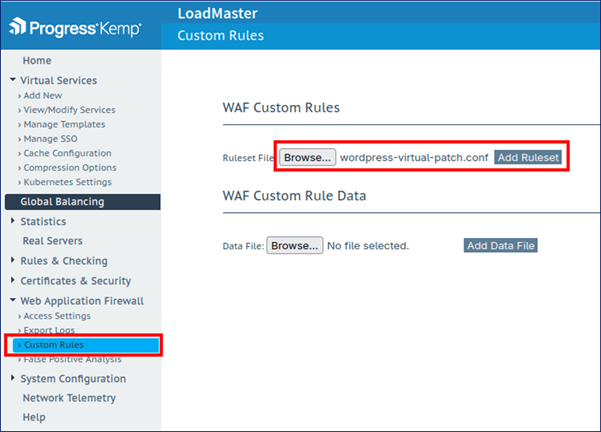
These custom rules can then immediately be added and applied to the WAF on a virtual service like so:
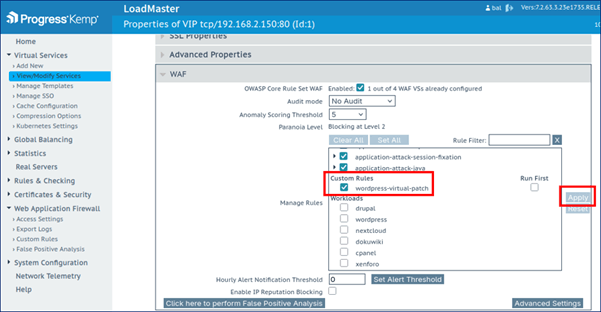
To test that both rules in the virtual patch are working as expected, test requests can be sent to verify that they are denied at the LoadMaster WAF:
$ curl 192.168.2.150/wp-json/batch/v1
<html><head><title>403 Forbidden</title></head><body>Access denied</body>
$ curl 192.168.2.150/?rest_route=/batch/v1
<html><head><title>403 Forbidden</title></head><body>Access denied</body>
Why Flexible WAF Capabilities Matter for Virtual Patching
While a full and proper fix is almost always the best solution to a vulnerable piece of software, there are many scenarios where this isn’t viable, as explored above. When this is the case, deploying a virtual patch can provide an effective interim mitigation strategy..
Having a flexible WAF is key, which allows for as much custom WAF logic and as many custom security rules as desired. Contrast this with cloud WAFs, which often hide useful WAF features, such as custom rules, behind higher price tiers, if they make custom WAF rules available at all.
If you have any specific questions or concerns about this WordPress vulnerability or how to patch it virtually, please contact LoadMaster support today.
Want to use LoadMaster WAF functionality but don’t have the Enterprise Plus license tier? Please reach out to your sales representative, who will be happy to discuss this.
Do you have other software you’d like to apply virtual patches to? Own legacy software that’s end-of-life and can never be officially patched? Need an interim virtual patch for a vulnerability until your next maintenance window? The LoadMaster WAF is a flexible platform well-suited to support this—across hardware, virtual and in the cloud.
Talk to an experienced LoadMaster representative today about your WAF and security needs.

Andrew Howe
Andrew Howe is a web application firewall expert at Progress. Passionate about free and open-source software, he is a developer for the open-source OWASP CRS security project, which helps defend web applications around the globe. Andrew lives in Southampton, UK, and is a fan of left-field cinema, classic synth-pop/disco, and tabletop gaming.
more from the author
Related tags
Explore more articles

Kemp is part of the Progress product portfolio. Progress is the leading provider of application development and digital experience technologies.
Copyright © 2026 Progress Software Corporation and/or its subsidiaries or affiliates. All Rights Reserved.
Progress and certain product names used herein are trademarks or registered trademarks of Progress Software Corporation and/or one of its subsidiaries or affiliates in the U.S. and/or other countries. See Trademarks for appropriate markings. All rights in any other trademarks contained herein are reserved by their respective owners and their inclusion does not imply an endorsement, affiliation, or sponsorship as between Progress and the respective owners.