Mitigating PHP2Shell with LoadMaster WAF

A pair of critical security vulnerabilities in PHP was publicly announced on 20 October 2026. The vulnerabilities, CVE-2026-109618 and CVE-2026-109619, were dubbed ‘PHP2Shell’ and have had a wide-ranging impact on the public internet, forcing huge numbers of vulnerable web servers to be updated.
Within the first day of disclosure, CDN services reported seeing a large number of attempts to exploit these vulnerabilities on their networks. Fortunately, although the PHP vulnerabilities are severe and warrant urgent fixing they may be difficult to exploit in practice. In brief, the core of the vulnerabilities is that specially crafted HTTP requests can cause exceptional conditions on the web server (most notably an out-of-memory, “OOM”, condition). This can be caused by large HTTP requests. Successful exploitation can result in Remote Code Execution (RCE), Denial of Service (DoS) through service errors and the exposure of sensitive data.
The only way to fully patch and resolve these issues is to update PHP on the affected web server to a fixed release. This has been confirmed in the official PHP security advisories (which can be found here and here), in addition to the analysis and coverage from most security researchers and organizations.
It is possible to implement partial controls only using a Web Application Firewall (WAF) or a reverse proxy: two core functionalities that Progress® Kemp® LoadMaster® provides.
In this blog, we talk about a range of mitigations that can be immediately deployed using LoadMaster WAF. Remember that these are strictly risk reductions only and do not provide complete protection. A vulnerable PHP installation must be fully patched to receive comprehensive fixes.
1a: Block Multipart Requests with LoadMaster WAF
One of the main attack vectors seen so far is to use HTTP multipart requests. This is the HTTP mechanism commonly used for file uploads and sometimes for submitting form field data.
Deny all multipart requests using the LoadMaster WAF to cut off this attack vector entirely. If an application does not use multipart requests, this mitigation should be painless. Otherwise, some parts of an application may stop working temporarily (e.g., file upload capabilities). This may be an acceptable trade-off until full PHP patching can be performed, e.g., during the next maintenance window.
To apply this mitigation, copy and paste the following custom WAF rule into your text editor of choice and save the file as “php2shell_block-multipart-requests.conf”:
SecRule REQUEST_HEADERS:Content-Type "@contains multipart" \
    "id:1000,\
    phase:1,\
    deny,\
    t:none,t:lowercase,\
    log,\
    msg:'Request with multipart content type',\
    logdata:'%{MATCHED_VAR}',\
    tag:'php2shell-mitigation',\
    tag:'LoadMaster',\
    tag:'PROGRESS-KEMP',\
    ver:'PROGRESS-KEMP/php2shell/1.0'"
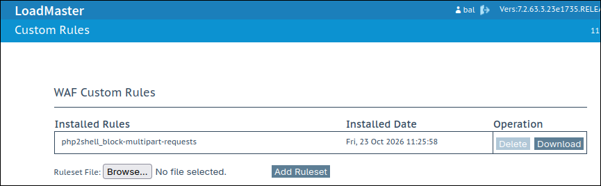
Upload the file to your LoadMaster under Web Application Firewall > Custom Rules, as shown below:
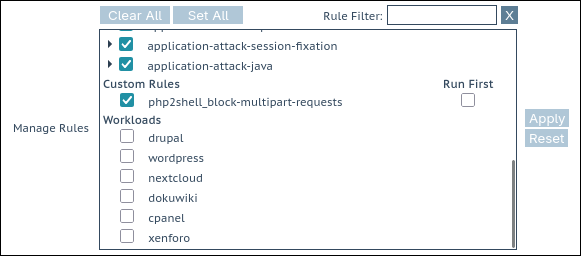
Apply the mitigation rule to your virtual service in the Manage Rules box, like shown below:
Test the mitigation by sending a multipart upload request, like so:
$ curl -v 192.168.2.150 -F file=@cat.jpg
⋮
> POST / HTTP/1.1
> Host: 192.168.2.150
> User-Agent: curl/8.22.0
> Accept: */*
> Content-Length: 2468843
> Content-Type: multipart/form-data; boundary=------------------------be3gVtLXHfEIf6Ki69M5l4
⋮
< HTTP/1.1 403 Forbidden
⋮
<html><head><title>403 Forbidden</title></head><body>Access denied</body>
Verify the denied request in the WAF log on the LoadMaster by navigating to System Configuration > Logging Options > System Log Files and opening the WAF Event Log File:
2026-10-23T11:34:02+00:00…[client 192.168.2.1]
ModSecurity: Access denied with code 403…String match "multipart" at REQUEST_HEADERS:Content-Type…
[msg "Request with multipart content type"]…
1b: Selectively Block Multipart Requests
If an application requires multipart requests (e.g., file uploads) to certain locations in order to function, then a more nuanced approach can be taken. The previous rule can be extended to selectively block multipart requests. A list of excluded URIs has been added: multipart requests will be allowed for these locations only; for all other locations, multipart requests will continue to be denied by default.
In the following example, the locations “/uploads” and “/users/folders/create” have been excluded from the multipart request block:
SecRule REQUEST_HEADERS:Content-Type "@contains multipart" \
    "id:1010,\
    phase:1,\
    deny,\
    t:none,t:lowercase,\
    log,\
    msg:'Request with multipart content type',\
    logdata:'%{MATCHED_VAR}',\
    tag:'php2shell-mitigation',\
    tag:'LoadMaster',\
    tag:'PROGRESS-KEMP',\
    ver:'PROGRESS-KEMP/php2shell/1.0',\
    chain"
    SecRule REQUEST_URI "!@rx ^(/uploads|/users/folders/create)$" \
        "t:none"
With the new custom rule applied, testing against an excluded location works:
$ curl -v 192.168.2.150/users/folders/create --form file=@cat.jpg
⋮
> POST /users/folders/create HTTP/1.1
⋮
> Content-Length: 2468843
> Content-Type: multipart/form-data; boundary=------------------------QRjVQTpdNC4LF085wFZc0c
⋮
< HTTP/1.1 200 OK
Testing against any other location is denied, as expected:
$ curl -v 192.168.2.150/foo --form file=@cat.jpg
⋮
> POST /foo HTTP/1.1
⋮
> Content-Length: 2468843
> Content-Type: multipart/form-data; boundary=------------------------fggh3h7ocaisLUHqfL37LT
>
< HTTP/1.1 403 Forbidden
The regular expression used to exclude specific locations can be extended as needed, for example, to include dynamic locations.
Clamp Down Requests
If it isn’t possible to block multipart requests (for example, if they are too deeply ingrained into an application to be blocked), then the next best approach is to restrict them to minimize the risk of them causing out-of-memory (OOM) issues in PHP on a backend server.
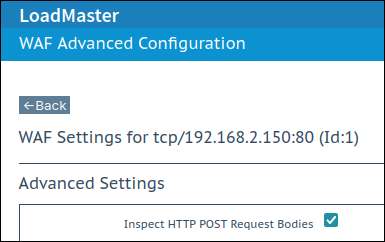
First, ensure the option "Inspect HTTP POST Request Bodies" is enabled on the Advanced Settings page, under the WAF tab, for the virtual service in question. The following restrictions will not work otherwise:
2a: Limit Number of Multipart Headers
To restrict the size and complexity of allowed multipart requests, you can limit the number of multipart headers. This should allow for simple file uploads but block unusual, complex requests that contain many multipart headers. If the example limit here causes issues with genuine, legitimate traffic, then it can be raised until no issues are seen.
Here is an example rule to limit the number of multipart headers to a maximum of 4:
SecRule &MULTIPART_PART_HEADERS "@gt 4" \
    "id:1100,\
    phase:2,\
    deny,\
    t:none,\
    log,\
    msg:'Too many multipart headers',\
    logdata:'%{MATCHED_VAR}',\
    tag:'php2shell-mitigation',\
    tag:'LoadMaster',\
    tag:'PROGRESS-KEMP',\
    ver:'PROGRESS-KEMP/php2shell/1.0'"
Testing that a simple file upload still works as intended:
$ curl -v 192.168.2.150 --form file=@cat.jpg
⋮
> POST / HTTP/1.1
⋮
< HTTP/1.1 200 OK
Testing that a multipart request containing multiple headers spread across multiple parts is denied, as expected:
$ curl -v 192.168.2.150 \
--form 'surname=jones;headers="X-New-Hdr: foo";headers="X-Something: bar"' \
--form 'fruit=kiwi;headers="Forwarded: yes"'
⋮
> POST / HTTP/1.1
⋮
> Content-Length: 313
> Content-Type: multipart/form-data; boundary=------------------------1UJd5CDDxmU7AMmvOb8wtJ
⋮
< HTTP/1.1 403 Forbidden
Verifying this from the LoadMaster WAF logs:
…Access denied with code 403 (phase 2). Operator GT matched 4 at MULTIPART_PART_HEADERS…[msg "Too many multipart headers"] [data "5"]…2b: Limit General Request Body Size
It’s a good idea to also limit the maximum allowed size of request bodies. This will apply to requests like POSTs with a content type of “x-www-form-urlencoded” where client data is sent in the request body in the form “arg1=foo&arg2=bar&…”. This is commonly used with simple form submissions and login pages, for example (“username=foo&password=bar”). These requests can also be abused to try to cause an out-of-memory situation, the same as with multipart requests.
To set the limit on the maximum request body size, navigate to the WAF tab of the virtual service in question and click on the Advanced Settings button in the lower-right corner. Set the Request Body Size Limit to the maximum number of bytes allowed. A sensible figure (high enough to avoid breaking a lot of applications) might be 512 kB, although many applications can go much lower (8 kB or even lower) and can be set with a much smaller and more secure figure here.
Click the Set Request Size Limit button when ready to apply the setting:
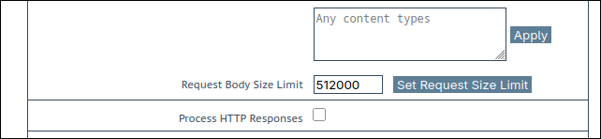
The size configured here must be sufficient to accommodate the largest request body needed by the web application under legitimate use (file uploads do not count towards this limit and are handled separately). For example, consider a JSON API. If the largest request body size under normal operation is a 28 kB blob of JSON, then this limit could be set to 32 kB, for example.
Note that this setting does not affect the maximum size of multipart file upload requests.
Testing
First, prepare a test file that is under the limit and another file that is over the limit. One simple way to do this on a Linux machine:
$ base64 -w0 </dev/urandom | head -c 511000 >511k.b64
$ base64 -w0 </dev/urandom | head -c 513000 >513k.b64
Sending the smaller file works fine:
$ curl -v 192.168.2.150 --data @511k.b64
⋮
> POST / HTTP/1.1
⋮
> Content-Length: 511000
> Content-Type: application/x-www-form-urlencoded
>
* upload completely sent off: 511000 bytes
< HTTP/1.1 200 OK
Sending the larger file gets rejected:
$ curl -v 192.168.2.150 --data @513k.b64
⋮
> POST / HTTP/1.1
⋮
> Content-Length: 513000
> Content-Type: application/x-www-form-urlencoded
>
* upload completely sent off: 513000 bytes
< HTTP/1.1 413 Unknown error
With a supporting log entry in the WAF log:
Request body no files data length is larger than the configured limit (512000).2c: Limit File Upload Sizes
A separate limit controls the maximum permitted size of file upload multipart requests. This should usually be larger than the general request body size limit (file uploads should usually be much larger than generic POST requests; file uploads are much cheaper to process through a WAF). For the purposes of tightening security controls to mitigate PHP2Shell, this limit should be set reasonably low to avoid large requests that could cause OOM errors in PHP.
To set the file upload size limit, for example, to 3 MB, use a custom rule file like the following and upload it to a LoadMaster:
SecAction "id:2000,phase:1,pass,nolog"
SecRequestBodyLimit 3000000
This can be tested by uploading one file smaller than and one file larger than the defined limit:
$ head -c 2MB </dev/urandom >2M.bin
$ head -c 4MB </dev/urandom >4M.bin
The smaller file uploads successfully:
$ curl -v 192.168.2.150 --form file=@2M.bin
⋮
> POST / HTTP/1.1
⋮
> Content-Length: 2000210
> Content-Type: multipart/form-data; boundary=------------------------qQmleTErGq9xhWGMaxC6Rf
>
* upload completely sent off: 2000210 bytes
< HTTP/1.1 200 OK
The larger file is blocked, as intended:
$ curl -v 192.168.2.150 --form file=@4M.bin
⋮
> POST / HTTP/1.1
⋮
> Content-Length: 4000210
> Content-Type: multipart/form-data; boundary=------------------------uhx2FpkMMdA2osVLDDwPre
>
* upload completely sent off: 4000210 bytes
< HTTP/1.1 413 Unknown error
3: Block Mentions of PHP Upload Progress
The session upload progress mechanism in PHP is another confirmed attack vector. Some POST requests explicitly reference this mechanism. Blocking these references is not confirmed to mitigate this attack vector: doing so is a very easy way to instantly block many of the probes, scanners and PoCs testing for this vulnerability.
To block the default string used to reference the PHP upload progress mechanism, use a custom WAF rule like the following:
SecRule ARGS_NAMES|FILES_NAMES "@contains php_session_upload_progress" \
    "id:1200,\
    phase:2,\
    deny,\
    t:none,t:lowercase,\
    log,\
    msg:'Reference to default PHP upload progress mechanism',\
    logdata:'%{MATCHED_VAR}',\
    tag:'php2shell-mitigation',\
    tag:'LoadMaster',\
    tag:'PROGRESS-KEMP',\
    ver:'PROGRESS-KEMP/php2shell/1.0'"
To test this rule, send a request like the following:
$ curl -v 192.168.2.150 --form "PHP_SESSION_UPLOAD_PROGRESS=foo"
⋮
< HTTP/1.1 403 Forbidden
Corroborated by a supporting WAF log line like the following:
…Access denied with code 403 (phase 2). String match "php_session_upload_progress" at ARGS_NAMES:PHP_SESSION_UPLOAD_PROGRESS…[msg "Reference to default PHP upload progress mechanism"] [data "php_session_upload_progress"]…Defend All Your Applications with LoadMaster WAF
The range of defensive measures presented here can help protect PHP applications against PHP2Shell attacks by using LoadMaster WAF. By utilizing LoadMaster WAF’s flexibility and custom rule logic, it’s quick and easy to put custom defense measures in place, including emergency protections like the ones presented here.
It’s important to be ready for the next cybersecurity emergency. It’s crucial to protect all web applications from attack. Every public-facing website and web application should be protected by a WAF. This is an achievable goal with LoadMaster WAF.
Thanks to the Enhanced WAF functionality in LoadMaster 360, tuning and maintaining a WAF setup has become an automated process without the need to process log data and write WAF rule exclusions by hand.
Check out our recent and ongoing bite-sized video series: ‘Getting Started with the LoadMaster WAF’. These short, digestible videos provide the key concepts to quickly get started with WAF deployment and setup.
Please do reach out with any questions you might have: let’s discuss your specific use cases and support you to robustly defend your APIs, web apps and AI-powered systems.
Finally, we invite you to try our fully featured 30-day free trial: test it, try out some of the protections above and see if it meets your needs.

Andrew Howe
Andrew Howe is a web application firewall expert at Progress. Passionate about free and open-source software, he is a developer for the open-source OWASP CRS security project, which helps defend web applications around the globe. Andrew lives in Southampton, UK, and is a fan of left-field cinema, classic synth-pop/disco, and tabletop gaming.
more from the author
Related tags
Explore more articles

Kemp is part of the Progress product portfolio. Progress is the leading provider of application development and digital experience technologies.
Copyright © 2026 Progress Software Corporation and/or its subsidiaries or affiliates. All Rights Reserved.
Progress and certain product names used herein are trademarks or registered trademarks of Progress Software Corporation and/or one of its subsidiaries or affiliates in the U.S. and/or other countries. See Trademarks for appropriate markings. All rights in any other trademarks contained herein are reserved by their respective owners and their inclusion does not imply an endorsement, affiliation, or sponsorship as between Progress and the respective owners.